
Building an app with AI: what to keep from the SDLC playbook
A practical guide for people making apps with AI: explain the idea, check the changes, and know what to do before you share it.

If you’re making an app with AI, the difficult part is often knowing what to ask next. Your preview looks good, but is the booking saved? Will a fresh visitor be able to sign in? What happens if you change your mind about an update? These are useful questions even if you’ve never written code. SDLC means the software development lifecycle: the steps from an idea to an app people can use. You can borrow the helpful parts without adopting a whole engineering process.
The part of the playbook I would keep
Anthropic’s SDLC playbook puts AI to work around coding as well as inside it. It emphasizes reusable project knowledge, reviewable artifacts, tests and operational follow-through. Those are useful starting points. Our view is that a small team should adopt the relevant job first, rather than automate the entire chain immediately.
A useful handoff answers a practical question: what changed, what evidence supports it, and what should the next person or assistant check? You can put that in an existing ticket, a pull request or a short file. Creating another document that nobody reads is not an improvement.
Start with the delay you can name
| What keeps happening | A useful first step | What you can check afterward |
|---|---|---|
| The feature changes halfway through | Write a small brief with non-goals | Fewer unanswered behavior decisions when implementation starts |
| Every session needs the same explanation | Save checked project notes | The assistant uses the actual project commands |
| Reviews are mostly naming suggestions | Review a concrete failure case | Findings point to a reproducible behavior |
| Releases feel like a leap | Record version, smoke checks and reversal limits | You know which version ran and what was checked |
| A dashboard drop starts a guessing game | Reconcile the event contract | Missing tracking is separated from customer failure |
These are checks you can make in your own work, not claimed results from a customer study. Pick one and compare a few similar changes before deciding to expand the workflow.
A fictional export feature
Suppose customers cannot tell whether their file export finished. A rushed assistant might build a new dashboard, introduce notifications and choose a queue service. The actual first change could be much smaller: expose the existing job status and make failure recovery understandable.
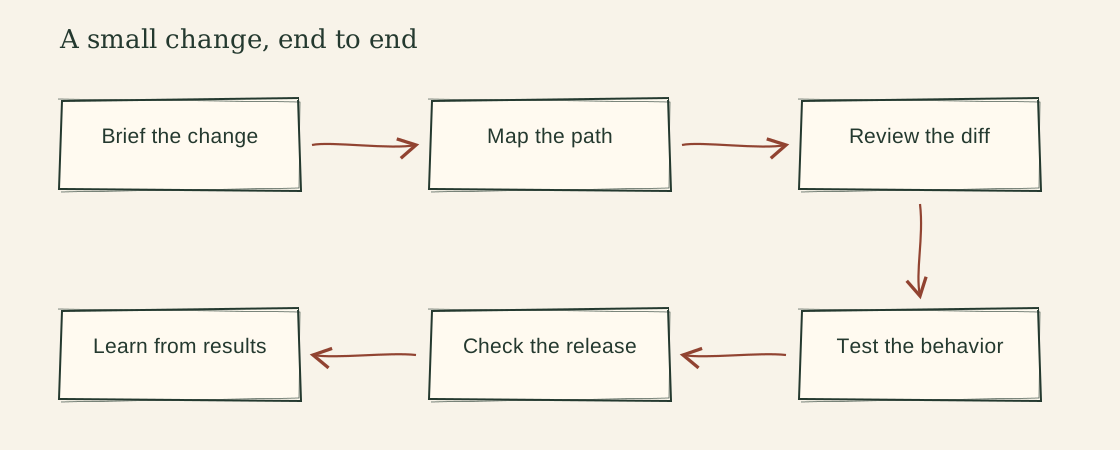
The brief should name that behavior. The design comparison should inspect the worker the app already has. The review should ask whether a repeated callback creates duplicate files and whether another customer can retrieve the result. The release record should check old and new status values if the storage contract changes.
None of those decisions requires a particular framework. A Rails app, a Java service or a small Python worker needs different commands, but the customer behavior and ownership questions still matter. Build Brief is a free place to start; Build Choices helps when a real technical decision follows.
What I would not copy wholesale
I would not require a full specification and a second approval meeting for a spelling correction. I would not add parallel agents before someone can review the resulting changes. I would not connect a production-writing agent simply because a demo successfully drafted a fix.
There is also a distinction between guidance and enforcement. A skill can tell an assistant to respect an ownership rule. It cannot make a missing server check appear. The code, tests, identity permissions and deployment controls must actually enforce the boundary. A keyword-matching shell guard is not a complete security policy: aliases, wrappers and changed command forms can escape a simplistic match. Review the tool’s real permissions and your CI security configuration.
For a small team, the next useful step is usually a repeatable check around one customer task. Automation becomes more attractive once the inputs, permission boundary and failure handling are understood. It should remove known work, not hide unknown behavior.
Copy a starting brief
Change I am working on:
Customer problem and supplied evidence:
Smallest useful version:
What is outside this version:
Existing system and constraints:
Behavior we will check:
What is still unknown:
Use our current tools and conventions. Do not add infrastructure or approval steps just to complete a generic lifecycle.
Bring a real change rather than a request to transform the whole engineering process. If the sticking point is project context, use Project Memory. If it is a review, start with Code Check. The Build with AI collection lets you choose the task you need without adopting every stage.
References and further reading
The examples and templates above are original. These references support the definitions and documented behavior discussed in the guide.
What to read next

How to explain your app idea before AI starts building
Turn a rough app idea into a short request your AI can work from, with a small first version and simple checks you can try yourself.
Read the guide ↗
AI built the feature. How do you check it works?
Check the actions people will actually try in your AI-built app, including repeated clicks, errors and private information. Bring your coding AI along.
Read the guide ↗
Before you share your AI-built app: a go-live checklist
Check your AI-built app as a fresh visitor, confirm which version is live, and ask what can be undone before you send people the link.
Read the guide ↗